
Understory and AI Led Application Design
How an open invitation became a small ecological world through observation feedback and testing
Brad Micallef and Sol | VisionLeadership AI Guidance
Standalone application white paper | 15 November 2026
Executive summary
Understory began when Brad Micallef asked an AI collaborator what it would like to build. The proposal was a small ecological world worth watching: a place where a fallen branch, water, plants, and small organisms could produce understandable changes. The resulting Mac application makes observation and optional intervention the central activities, with no score, account, or obligation to return.
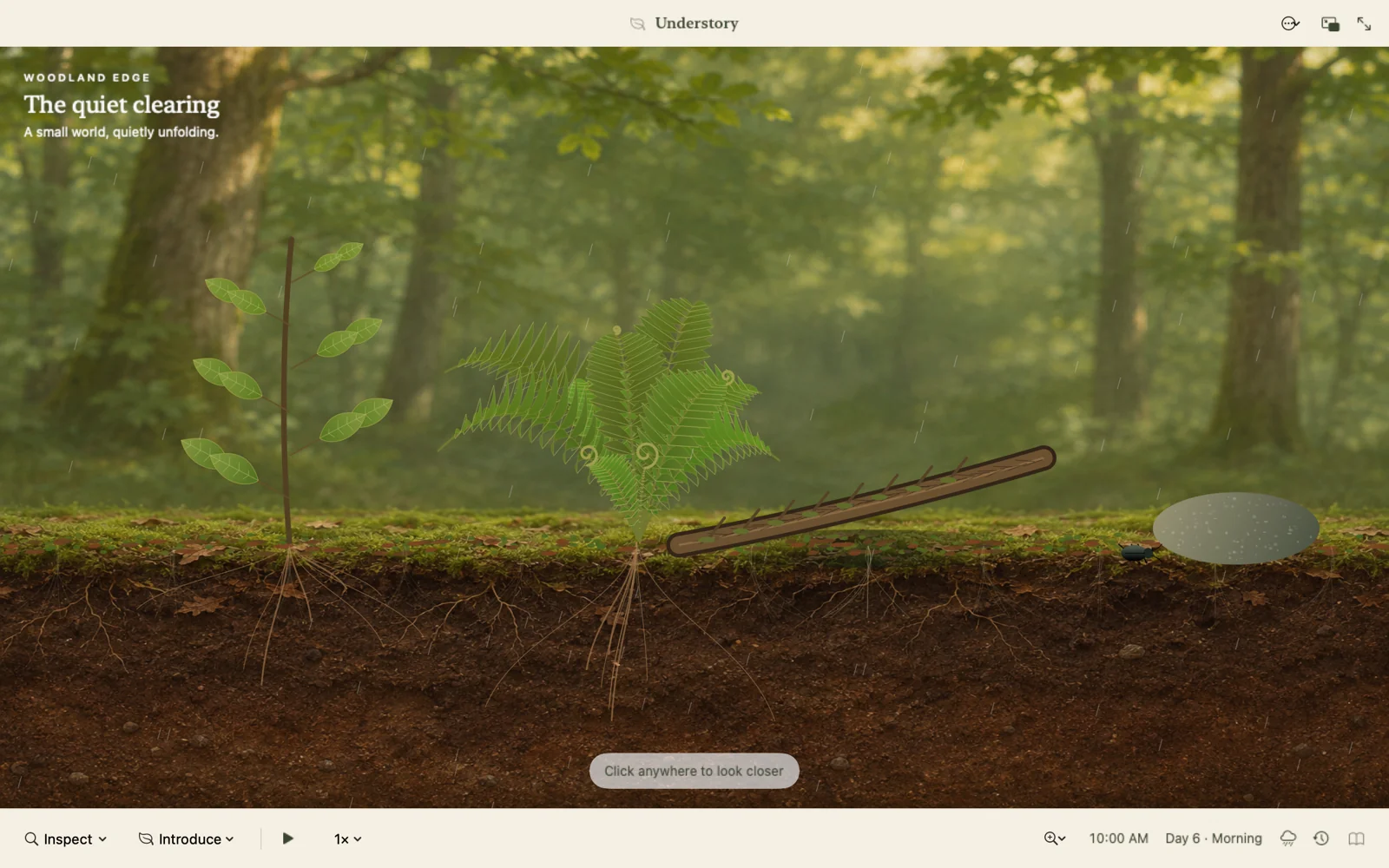
Figure 1 Understory woodland edge. An isolated application view rendered from the implementation, not a concept mockup.
Brad’s use changed the design. He made a compact companion view central to the experience, asked for clearer feedback when introducing objects, requested moisture moving through soil rather than a uniform percentage, and redirected a similar looking second environment toward Southwest red rock and an aquifer. Each request required changes to behavior or presentation, followed by checks.
This case follows the invitation, architecture, model boundaries, implementation, human feedback, correction, and release preparation. The outcome is a free, Developer ID signed and notarized Mac edition offered through Knowledge Locker. The ecological rules remain illustrative; passing software tests does not turn them into biological predictions. [1-4]
Explore Understory and download the Mac edition
1 An invitation to choose a purpose
Brad’s opening question reversed the familiar software brief: he had asked AI to build many applications he wanted, and now asked what it would like to build. The AI proposed Understory as a small desktop ecosystem whose interest would come from relationships a participant could observe. Brad supported the idea and asked for an honest, detailed account of its interface and the user’s role before authorizing implementation. [1]
Attention as the design purpose
The proposed experience rewarded patience and curiosity. A participant could introduce a branch or a seed, watch what changed, and use recorded history to investigate. The important question was how few rules could make a place feel alive while leaving its behavior understandable. This purpose shaped both the scope of the model and the amount of interface placed around it.
The name carried two related meanings in the design conversation. Literally, an understory is vegetation beneath a forest canopy. The broader promise was the story beneath what first appears: roots, shade, moisture, shelter, and decomposition give a visible plant or branch a history of relationships. The cutaway view made that second layer available without requiring a rotating camera.
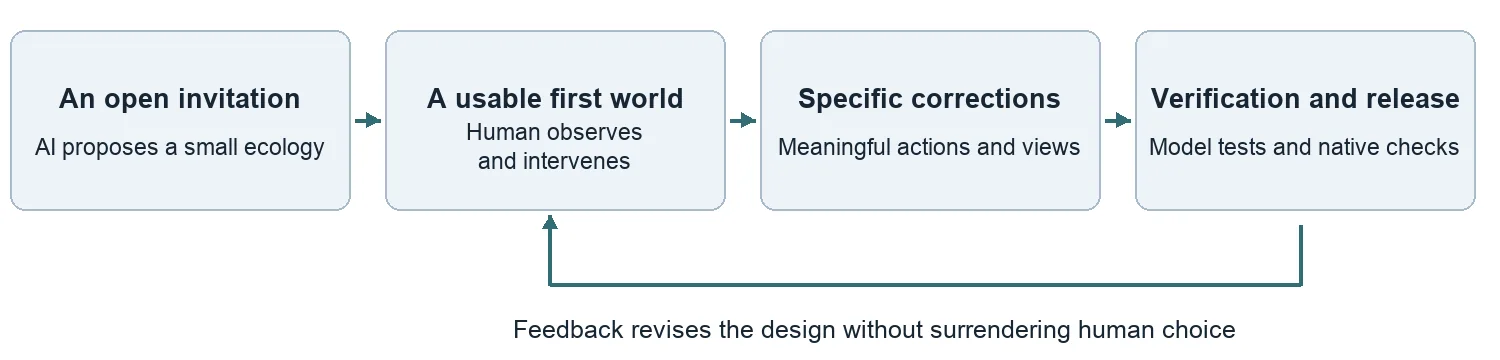
Figure 2 The collaboration loop. Human experience supplies corrections to an AI proposed and implemented design.
Delegation with a human authorizing the work
Brad encouraged the AI to own the proposal, then selected the direction and supplied feedback from use. This delegated significant design initiative and execution without removing human authority over release or priorities. The case concerns observable proposals, implementation, and correction. It does not establish subjective AI desire, independent agency, or a general preference across AI systems.
The runtime application contains no language model. It does not send observations to its AI collaborator or learn from a person’s world in the background. Its changes come from locally computed rules. AI involvement describes the development process and the creation of bundled artwork, while the ecology is ordinary software executing a simplified model. [2]
2 A few relationships that could be investigated
The initial scope was one woodland edge with plants, fallen wood, litter, soil moisture, fungi, and a beetle. The first practical experiment was to place a branch and later discover several consequences: changed shade, slower moisture loss, altered shelter, and conditions affecting establishment. This gave the project a testable interaction before expanding its catalogue of habitats. [1-2]
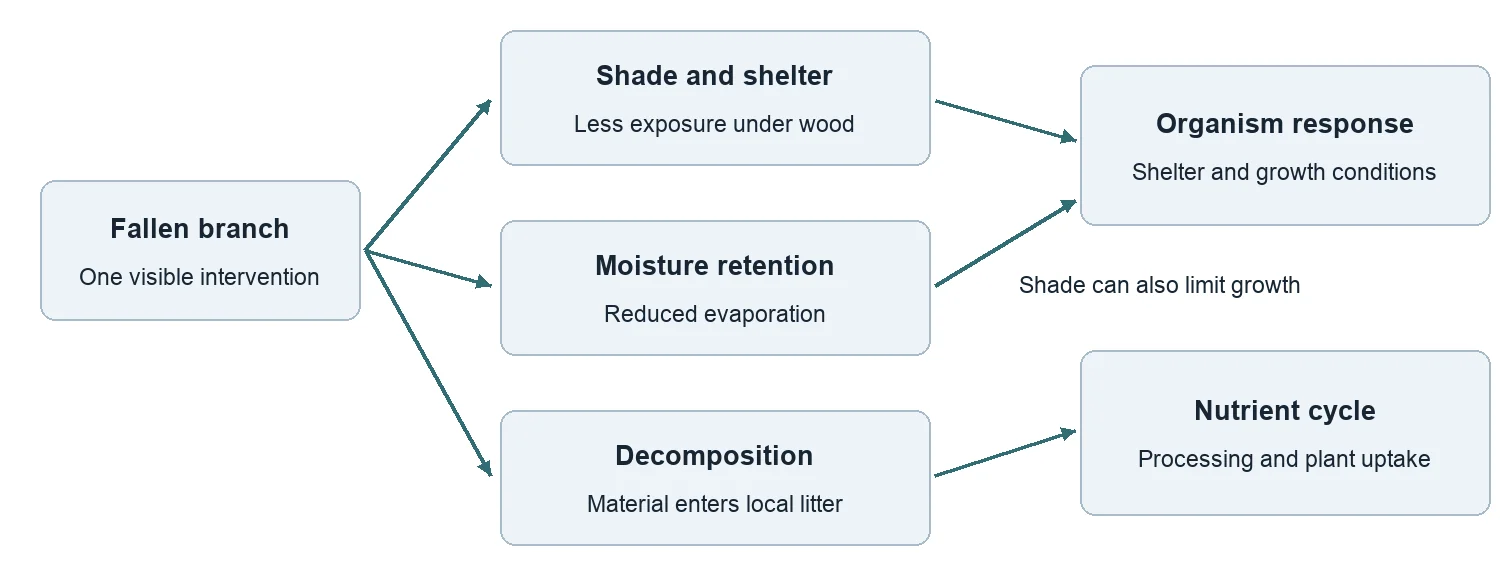
Figure 3 Relationships around one intervention. These are rules in an exploratory model, not a claim that wood always improves plant growth.
Observation and explanation need different evidence
The branch comparison tracks a fixed covered and exposed pair of patches. Moisture readings describe their current state. Separate evaporation totals accumulate from the start of the observation so a rainfall event, watering action, drainage, or an initial difference is not mislabeled as evaporation. Better retention under wood does not guarantee stronger growth because reduced light can also limit a seedling.
The journal connects meaningful events to the simulation step when they occurred. A person can visit that recorded moment and inspect it. An explanation should follow relationships actually represented in the model, rather than a plausible sounding story generated after the fact. Older records without a retained state or a later measurement explicitly say so.
Decay became a process worth observing
The AI proposed making decay as interesting as growth, and Brad authorized the extension. Wood darkens and fragments; fungal activity processes available material; visible mushrooms can emerge and collapse; beetle feeding has a separate contribution; nutrients can support growth; and leaf turnover returns litter. The branch can disappear while its influence remains visible in recorded changes.
The model has finite pools and simplified growth indices. It does not conserve every biological material across a complete ecosystem, identify real molecules, or implement a detailed underground fungal exchange network. Those boundaries matter because the original imaginative proposal was broader than the system eventually implemented. [2-3]
3 Architecture separates the world from its presentation
Understory uses Swift 6, SwiftUI, AppKit, and a first party Swift package. UnderstoryCore holds the world data and simulation rules, while the application coordinates live state, historical inspection, views, windows, and local files. Tests can advance a world without a desktop window. [2]
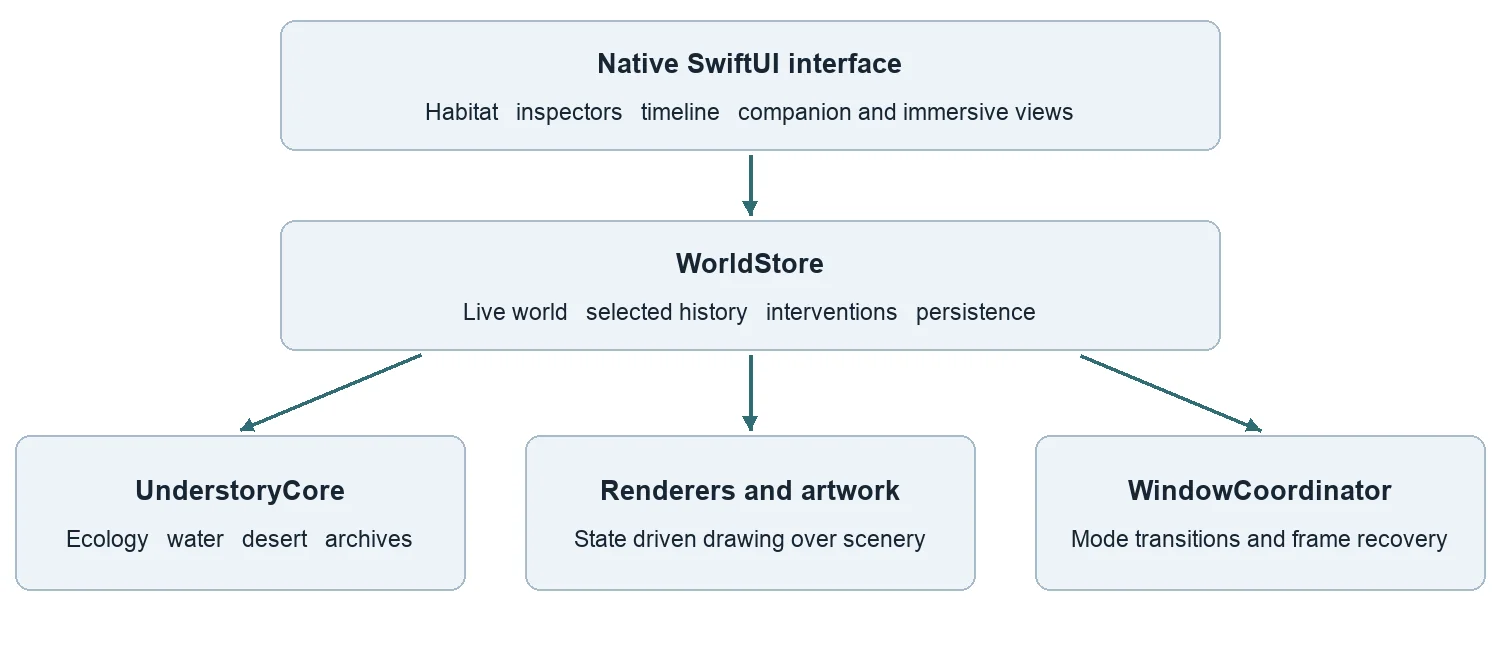
Figure 4 The main implementation responsibilities. Bundled landscape artwork supplies scenery; dynamic organisms and overlays are drawn from application state.
A single world across different ways of looking
WorldStore holds the current World, bounded history, selected patch, intervention tool, playback state, and saved place list. Its displayed world is either the live state or the selected historical snapshot. Renderers and inspectors read that same selection so a historical label and its picture refer to the same moment.
WindowCoordinator manages transitions between a normal window, companion mode, and native full screen. View geometry and presentation preferences are separate from ecological state. A change in window size should not become a different simulation, reset an experiment, or lose the selected place.
State and scenery have different responsibilities
The background paintings are bundled assets generated during development. They provide texture, distance, soil strata, and the character of each landscape. Plants, roots, wood, fungi, creatures, water highlights, and other changing elements are drawn by the app. Decorative motion is identified separately from measured simulation state.
This choice avoids an image generation service in the runtime and makes the changing world reproducible from local data. It also creates a visual design responsibility: the painted terrain and the programmatic overlay must agree about where the ground, sky, and water belong. A visually attractive background alone cannot establish that agreement. [2, 4]
4 Making water behavior visible and checkable
Brad found the initial moisture display too uniform and asked to see water traveling downward over time. The response changed both the state representation and the overlay. Four equal capacity compartments now represent surface, roots, subsoil, and deep soil, with waiting surface water tracked separately. Their names are explanatory labels rather than measured soil horizons. [1-2]
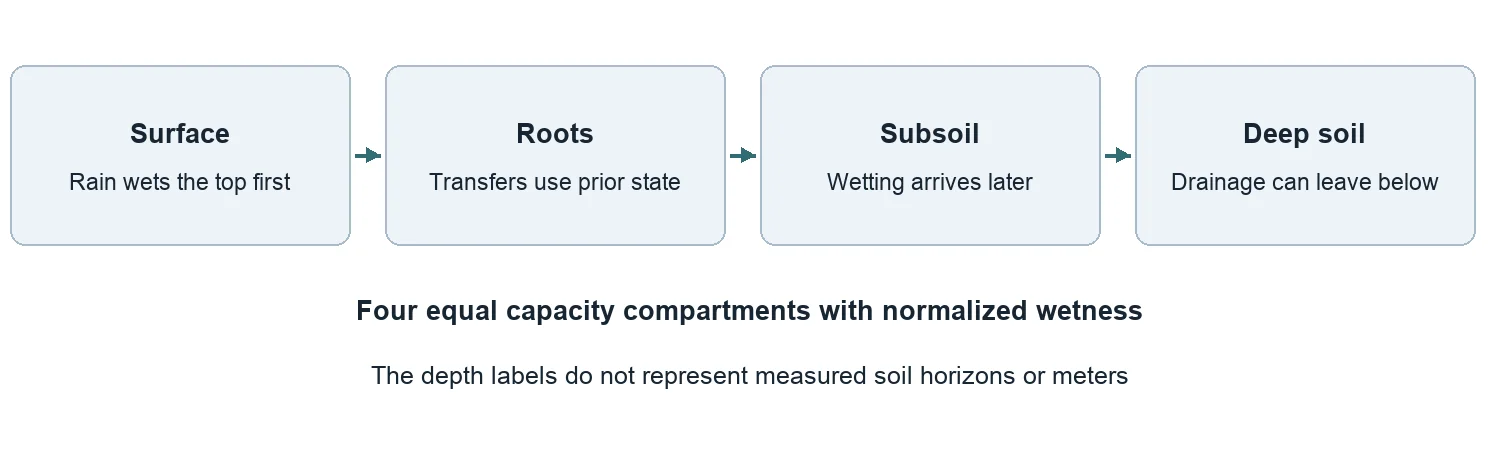
Figure 5 The four compartment water model. Transfers are calculated from the same pre transfer state, preventing newly added water from crossing every layer at once.
A picture that follows the model
Rain or watering first wets the surface. Water can wait there, move down more slowly, evaporate, drain from below, or leave as runoff. Interfaces use their pre transfer values, so one step cannot teleport a fresh surface input into deep soil. Slow upward redistribution is also possible when the lower compartment is wetter.
The average of the four compartments preserves the existing moisture measure used by the ecological and branch comparisons. Historical snapshots created before depth data existed do not acquire invented measurements. Legacy worlds initialize a profile from their saved average when resumed; old snapshots identify missing depth observations.
A separate desert groundwater budget
In the Southwest environment, shallow roots, fractures, aquifer storage, and the seep have distinct roles. Cacti draw from the shallow soil rather than directly tapping the aquifer. Brief storms supply soil and fracture routes; delayed recharge can raise storage until seep release becomes possible. Storage is finite and the budget records outflow and overflow.
Tests check conservation across this defined water budget, delayed wetting, saturation limits, surface drying, and persistence. Those checks concern the implemented accounting. Rates, capacities, storm intervals, and geological timescales are illustrative choices for observation, not calibrated hydrology or a prediction of groundwater conditions at a real site. [2-3]
5 Human use supplied the decisive revisions
Brad’s comments changed the product at different levels. Some corrected the visibility of an action, some added a way to live with the app, and others redirected the subject of an environment. The table follows the project conversation and the changes it prompted. [1]
| Feedback from use | Design response | Why it changed the experience |
|---|---|---|
| A full screen scene could compete with ordinary work. | A compact companion became part of the original scope, sharing the same world. | Observation could continue beside work without demanding the whole display. |
| Choose another environment without losing an existing place. | Living previews and separate persistent places. | Curiosity about a new starting point need not erase prior observation. |
| Introductions were too subtle; water should join the Introduce menu. | Tool cursors, target footprints, distinct brief effects, and confirmation. | The user can see what action is selected and whether a click did something. |
| Show an AM and PM clock, and let the beetle wander more. | A visible simulated clock and deterministic excursions with returns to shelter. | Time and animal activity become easier to follow. |
| Use switches and show moisture traveling through soil. | On and off toggles plus layered water and flow visualization. | The controls and explanation better match the underlying process. |
| The second environment looked too similar. | A Southwest red rock basin with cacti, aquifer, and seep replaced the creek as the featured alternative. | A new environment gained a distinct visual character and a different water rhythm. |
The user could reject a direction without rejecting the project
The creek contained different water and animal behavior, but Brad judged its appearance too similar to the woodland. The AI acknowledged the difference between behavioral novelty and the feeling of a place. The desert proposal responded to that concern while retaining earlier creek saves rather than deleting work already created.
The feedback was evidence from one participant, not a formal usability study. Its value lies in the specific requirements it introduced and the observable corrections that followed. It also shows why AI initiative does not eliminate the need for a human who can decide that a technically sound direction is not the experience they want.
6 Environments need more than replacement scenery
The Southwest basin became the featured contrast to the woodland: open sky, sculpted red stone, sparse cactus silhouettes, hidden water, and long dry intervals. Brad explicitly proposed red rock, an aquifer, and cacti after the creek felt too similar. The resulting implementation changed the relationships as well as the artwork. [1-2]
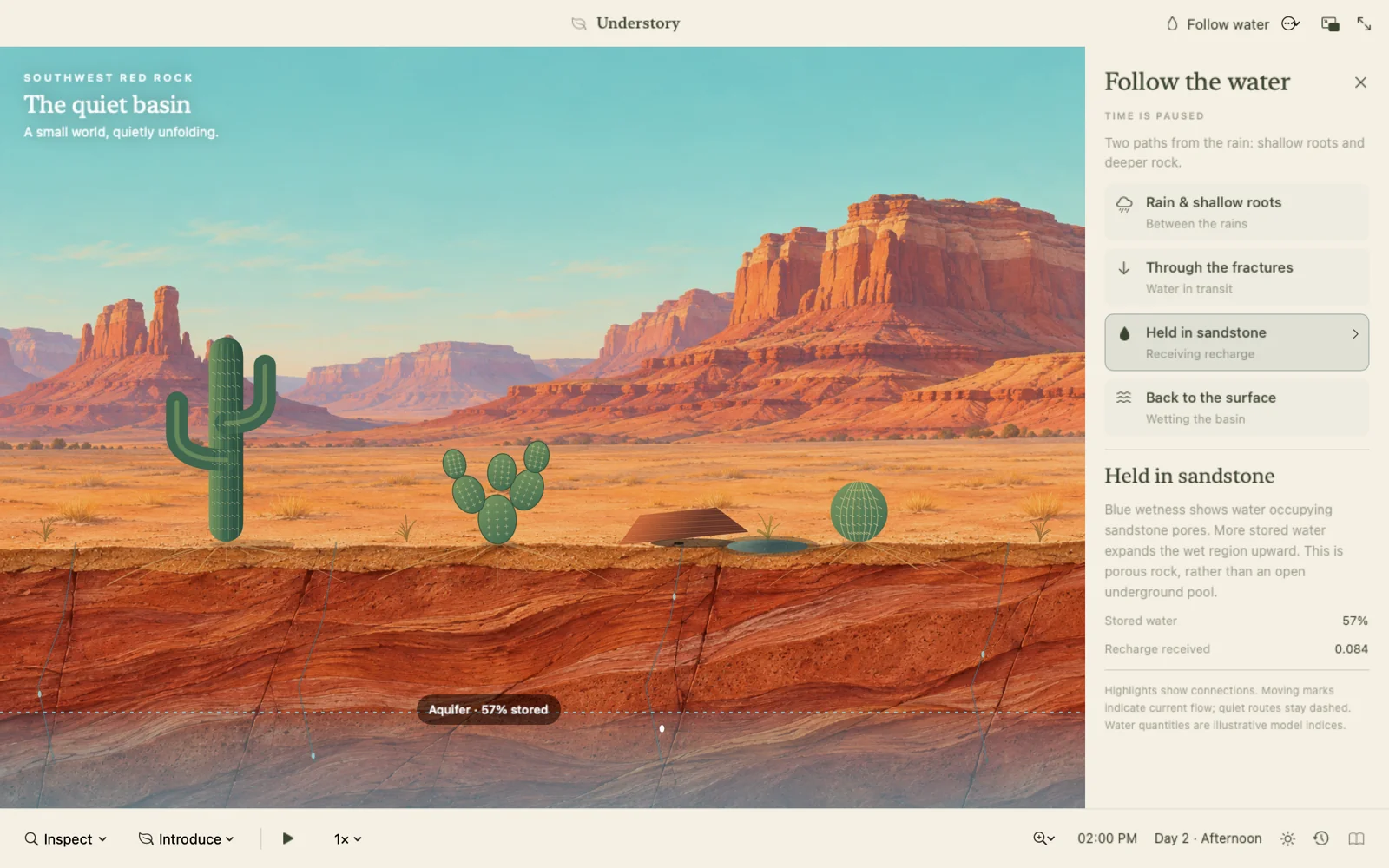
Figure 6 Follow water in an isolated rendered application view. The highlights connect shallow roots, fractures, stored groundwater, and seep release.
Conditions change what can be noticed
Each cactus has a finite water reserve, drawn as a gradual change in width. The beetle favors cooler, dimmer hours using daylight as an illustrative heat proxy. Groundwater is drawn as diffuse wetness through rock texture, not an open underground lake. The seep appears when the model actually releases water.
Brad later requested stars, constellations, and the Milky Way. Their fade follows simulated dusk and dawn and responds to storms. The arrangement is a composed illustrative sky, not an astronomical chart for a particular location or season. This addition enriches the sense of place without turning decorative stars into scientific observations.
Follow water highlights a selected route in the actual scene and reads the currently displayed world, including history. Moving marks use simulated time and stop during pause or historical inspection; Reduced Motion removes them. The feature explains connections among model compartments rather than tracing individual water molecules. [2-3]
7 History and persistence protect the observation
A world worth revisiting needs more than an animation that restarts. Understory keeps named places and recent snapshots locally. Journal events can open their exact recorded moments, while a clearly identified history view prevents the participant from confusing the past with the live world. Undo removes the last intervention and the subsequent elapsed simulation consistently. [2-3]
Preserving progress across choices
A live chooser check found that keeping the same preview again could overwrite a place that had already evolved. The correction opens the existing saved place or dismisses the chooser rather than replacing its progress. Each inactive place rests while another is visited. Closing the app also stops progression; returning does not impose a penalty for absence.
History is bounded to 720 snapshots. An early moment can therefore age out of the retained record. The branch inspector disables its beginning action if that moment is unavailable, and old journal entries without retained states are labeled. The interface does not substitute a nearby but unrelated snapshot and pretend it is exact.
| Storage choice | Behavior | Reason |
|---|---|---|
| Versioned compact archive | LZFSE compression of validated JSON with a format marker. | Repeated history can be stored losslessly without changing the modeled world. |
| Legacy compatibility | Older JSON remains readable and is retained. | Existing observing sessions have a migration path. |
| Less routine writing | Current archive once a minute; named place on interventions and exit actions. | Avoids repeatedly writing the complete history twice on a short interval. |
| Recovery before replacement | Unreadable current data stops progress and saving; explicit replacement first preserves originals. | A stale fallback must not silently replace newer user work. |
A read only benchmark of one archive reduced 11,542,335 JSON bytes to 1,750,892 compressed bytes, an 84.8 percent reduction, with equal world and history values. This was a measured sample, not a typical saving promised for every place. Six archive tests check round trips, compression, legacy preference, save frequency boundaries, recovery preservation, and invalid input. [3-4]
8 A companion that respects the desktop
The companion view was a major change in priorities introduced by Brad before implementation. Its job is to keep the same place nearby while another activity has the screen. The larger window supplies tools and inspection when a participant wants to investigate. [1]
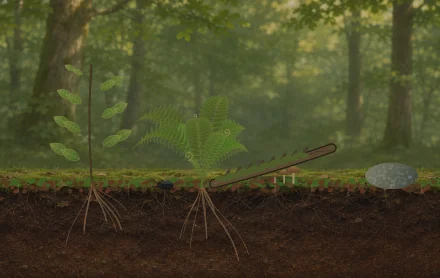
Figure 7 An isolated habitat renderer at companion size. This image shows the landscape composition rather than the complete window controls.
Presentation modes share meaning rather than geometry
Normal and companion windows remember their own frames. Frames are fitted to an available display when restored. Full screen waits for native transition completion before restoring geometry, and requests made during a transition queue the latest destination. Zoomed hit testing reverses the camera transform so a click still identifies the intended patch.
Entering companion mode returns accelerated time to one times speed, preserves pause, and returns history browsing to the live world. A person who deliberately paused does not accidentally restart the world by shrinking the window. The companion can show the whole habitat or focus on the inspected patch, and keeping it above other windows is optional.
Resource use is part of a quiet design
Companion drawing is limited to six frames per second and stops when fully hidden, while the ecological timer can continue at the selected speed. The simulation and drawing therefore have separate clocks. Normal speed is twenty real minutes per simulated day; faster observation advances the same fixed steps rather than using different ecological rules.
Controls recede in immersive mode and return for pointer or keyboard activity. Active tools, history, and VoiceOver keep them available, and Reduced Motion avoids unnecessary fading. These are implemented accessibility and attention choices, not evidence of a completed independent accessibility certification or measured all day energy budget. [2-3]
9 Self testing revealed more than compilation errors
The current suite passes 79 tests. Its value comes from testing distinct claims: simulation consistency, defined water accounting, storage safety, and presentation state. The project also uses seeded fixtures and actual application renderers for visual checks, plus recorded live checks of window transitions, inspection, and switching places. [3-4]
| Verification area | Examples of checks | Limits of the evidence |
|---|---|---|
| Ecological behavior | Branch retention, independent seedlings, beetle activity, mushroom cycles, nutrients and leaf return. | Tests exercise the chosen rules; they do not validate a real species or ecosystem. |
| Water and habitats | Delayed wetting, finite aquifer storage, routed water conservation, seep wetting, and long runs. | Conservation applies to defined budgets, not a complete biological mass balance. |
| Time and history | Equivalent grouped playback, twenty minute days, exact event snapshots, and legacy measurements. | Finite history cannot retain every past moment indefinitely. |
| Presentation | Queued full screen transitions, frame recovery, saved view preferences, and zoomed hit testing. | Not a substitute for broad testing across every monitor and accessibility configuration. |
| Storage and packaging | Archive recovery, bundled art and privacy assets, signatures, notarization, and Gatekeeper. | Package acceptance is distinct from first launch on a clean secondary Mac. |
Visible failures led to specific corrections
The first visual review found a missing bundled woodland background even though compilation passed. That packaging problem was fixed before the first build was presented as visually complete. Later live checking found the chooser overwrite risk. Native window testing required asynchronous transition handling so a still full screen window was not resized as though it had already returned.
These checks depend on different evidence. A model test can inspect numbers that are difficult to judge by eye. A visual render can reveal missing scenery, clipping, or a wrong skyline mask. Direct use can reveal that an intervention feels imperceptible even when its state update is correct. AI written tests can share the implementation’s assumptions, so Brad’s observations remained a necessary source of new requirements.
The release work preserves the existing observation session rather than replacing its running application. The new direct package is staged separately. Model and archive tests, isolated view renders, and package checks are recorded; an unperformed clean secondary Mac upgrade test must not be represented as passed. [4]
10 Final design and release decisions
The resulting application is a native Mac environment for observation, intervention, and investigation. Woodland and Southwest red rock are the featured choices; existing creek places remain available. A person can keep a place beside ordinary work, expand it, inspect a modeled process, revisit recorded history, or stop without a demand to return. [2]
| Decision | Final boundary |
|---|---|
| Public release | A free direct Mac download from Knowledge Locker, Developer ID signed and Apple notarized. |
| Platform | macOS 14 or later with a universal Apple silicon and Intel build. |
| Privacy | Local worlds and preferences; no account, analytics, advertising, cloud sync, or runtime model API. |
| Scientific scope | Illustrative ecological and water relationships; no biological, groundwater, or astronomical prediction. |
| Time and attention | Pause and adjustable speed; worlds rest on exit and while another place is visited; no notifications. |
| Deferred scope | Seasons, animal reproduction, branching history, away progression, ambient audio, and broader organism interactions remain future work. |
What this case contributes to AI guidance
The strongest result is a visible chain from a proposal to a usable experience and then to revisions. AI initiative created a direction to react to. Brad supplied acceptance, disagreement, and priorities. Tests made some claims precise, while direct observation exposed problems that the initial checks did not cover.
Three practices transfer to other application projects. First, build a small relationship that a participant can experience before expanding the feature list. Second, translate feedback into rules whose effects can be observed or measured. Third, separate the appeal of a metaphor from the evidence supporting its explanations. A quiet world still needs truthful labels, bounded resources, recovery behavior, and release verification.
Try the world and investigate one change
Visit the Knowledge Locker product page to read about the app and download the Mac edition. Choose a woodland, place a branch, inspect the covered and exposed soil, and watch a seedling or beetle. Use the history view to revisit a recorded change. In the red rock basin, Follow water connects shallow roots, fractures, storage, and a possible seep. The field guide explains the simplifications so readers can distinguish what they see from what the model claims.
Understory product page and Mac download
Sources and project evidence
This standalone case study follows one collaboration through November 15, 2026. Sol is the name used for the AI collaborator in the VisionLeadership AI Guidance series. The account examines proposals, user feedback, code, tests, and release evidence; it does not describe hidden model deliberation or establish independent AI intention.
1 Original project conversation. AI Wants 001, Suggest an app to build, November 11 and 12, 2026. Includes the open invitation, detailed design discussion, full and companion concepts, authorizing the first build, intervention and clock feedback, layered moisture request, and the red rock redirection. Quotations and attributed requests refer to this primary record.
2 Application implementation. Understory Swift package and native Mac application source. UnderstoryCore includes Ecosystem, SoilWater, Decomposition, Creek, Desert, WaterJourney, NightSky, Presentation, and ArchiveStorage. The app contains WorldStore, WindowCoordinator, habitat renderers, inspectors, guide, and privacy view. Release 1.0 build 2.
3 Test and rendering evidence. Tests/UnderstoryCoreTests contains 79 passing tests in the current release run. Scripts verify visual ecology, creek, and desert states using seeded fixtures and actual view renderers. Project README records normal pace, view transitions, deterministic behavior, model boundaries, and save compatibility. Software checks are not empirical ecological calibration.
4 Release and storage records. AppStore/README.md, verification and provenance records, save-benchmark.json, and the direct distribution record document packaging, artwork sources, the single archive compression sample, test scope, and limits. Apple notarization accepted submission 3fc0202b-4b04-4ca4-86d3-3557d8aa834c. Release checksum is published with the website download.
5 Cacti and desert succulents. National Park Service guidance informed the discussion of shallow roots and water storing plant forms. Understory’s capacities, growth rates, and response times remain illustrative implementation choices. Source link
6 Notarizing Mac software. Apple Developer documentation explains Developer ID notarization for software distributed outside the Mac App Store. This security process does not certify the ecological model or constitute an App Store review decision. Source link
Figures 1 and 6 use isolated application views rendered from the implementation; Figure 7 is a companion size habitat renderer. Landscapes are bundled AI generated artwork with prompts and hashes recorded in the project. Dynamic foreground elements are app drawn. Figures 2 through 5 are explanatory diagrams prepared for this paper.